Digital Zoo SEO Helper
“See the key SEO insights at a glance the moment you open a page.”
Digital Zoo SEO Helper is not just “one more SEO plugin you can install” – it’s built to be your everyday companion when you’re in meetings, building decks, planning campaigns, or reviewing performance, so you naturally open it to support your decisions and strategy.
A truly free SEO tool with no login, no ads, and no hidden paywalls.

See key SEO signals clearly the moment a page loads.
Traditional Chinese–first experience, no login, no ads, and no payment required.
Modelled after the actual audit workflow used by our own SEO agency.
All your core checks – meta, structure, speed, and content – streamlined into a single extension.


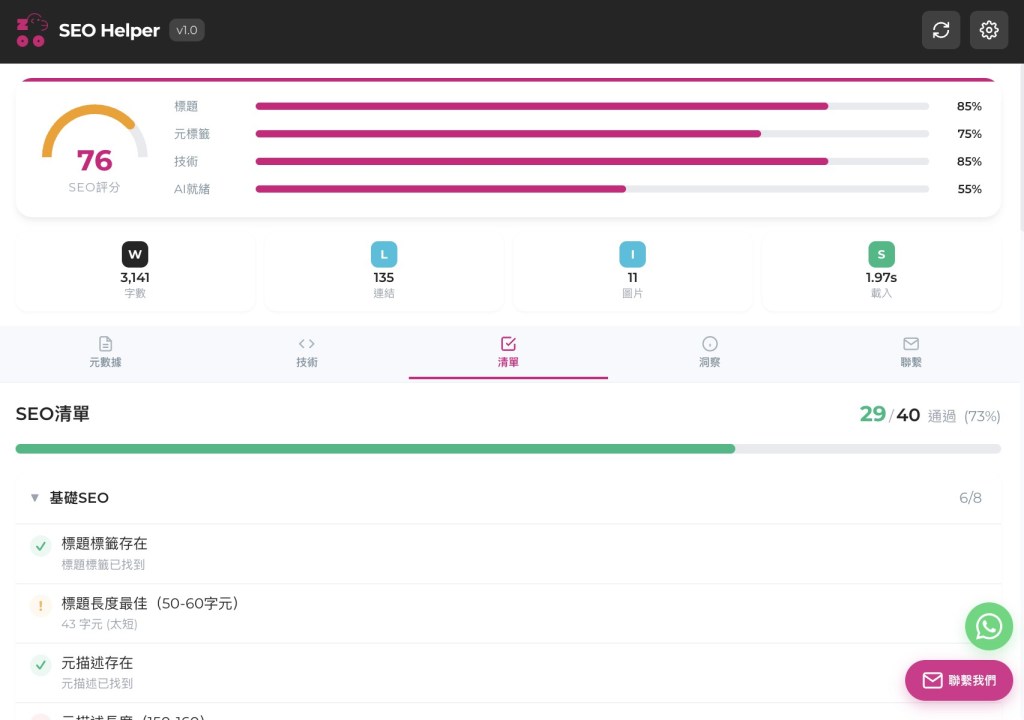

Instantly capture and evaluate title and meta description length, keyword usage, and appeal, then get concrete suggestions to help improve organic click-through rates.
Clearly shows canonical targets and robots directives so you can quickly spot duplicate content, indexing mistakes, or unnecessary noindex settings.
Verifies whether your sitemap can be properly read and covers key pages, helping you identify 404 links, missing pages, or structural issues early.
Lists every heading level on the page so you can immediately see multiple H1s, skipped levels, or messy hierarchy, making it easier to refine your content structure.
Automatically generates a structured SEO checklist based on the current page, grouping issues and recommendations so you can use it as a lightweight audit report or as a clear communication reference.
Uses AI to synthesize the page’s SEO signals and deliver focused, priority-based suggestions, giving you a practical starting point to refine titles, content, and technical settings.
What is an SEO tool and why should I use one?
An SEO tool helps you analyze and improve how your website appears in search engines, from meta data and structure to content and performance. By using an SEO tool, you can systematically spot issues, prioritize fixes, and grow organic traffic more efficiently.
How is this free SEO tool different from typical SEO Chrome extensions?
Most SEO Chrome extensions focus on English sites and lock key features behind paywalls or logins, while this free SEO tool is built by a Hong Kong SEO agency with Traditional Chinese–first support and no hidden upgrades. It’s designed around real audit workflows, so the features match what marketers actually do day to day.
Do I need an account or to pay to use this SEO tool?
No. You can install and start using the tool immediately without creating an account, adding a credit card, or subscribing to any plan. All core features are available for free.
Is this SEO tool suitable for beginners or only for professionals?
It’s built for both: beginners get a clear, guided view of each page’s key SEO elements, while professionals get the essential checks they need for fast audits. The interface and wording are kept straightforward so non-technical users can still understand the insights.
Will this SEO tool affect my website speed or security?
No. The tool runs in your browser and reads publicly available information on the page you are viewing; it does not modify your site’s code or server settings. It won’t slow down your website or introduce security risks.
Can this SEO tool replace traditional SEO reports or a professional consultant?
It can greatly speed up checks and help you assemble quick audit findings, but it doesn’t replace strategy, prioritization, or experienced judgment. The best use is to pair this tool’s insights with your own expertise or a professional SEO consultant.
What kind of day-to-day work is this SEO tool best for?
You can use it for quick page reviews, pre-launch checks on new content, spot audits during meetings, and identifying which pages need SEO improvements first. It’s especially useful when you need fast answers without logging into multiple platforms.
How do I install Digital Zoo SEO Helper?
Open your Chrome browser, go to the Chrome Web Store, search for “Digital Zoo SEO Helper,” and click “Add to Chrome.” Once installed, pin the extension icon to your toolbar so you can open it with a single click on any page.
Which browsers does this SEO tool support?
Digital Zoo SEO Helper is designed primarily for Google Chrome. It may also work on other Chromium-based browsers that support Chrome extensions, but Chrome offers the most stable and fully tested experience.
What should I do if I run into issues installing or using the SEO tool?
First, check that your browser is updated to the latest version and that the extension is enabled. If problems persist, try reinstalling the extension and, if needed, contact us with a brief description and screenshots so we can help investigate.